Bottleneck Calculator – Test Your CPU, GPU & PC Performance
Analyze your CPU and GPU balance to optimize gaming performance and identify hardware limitations.
RAM Amount
RAM Type
Primary Storage
Primary Purpose
Monitor Refresh Rate
Game (Optional)
Graphics Settings
What Is a PC Bottleneck?
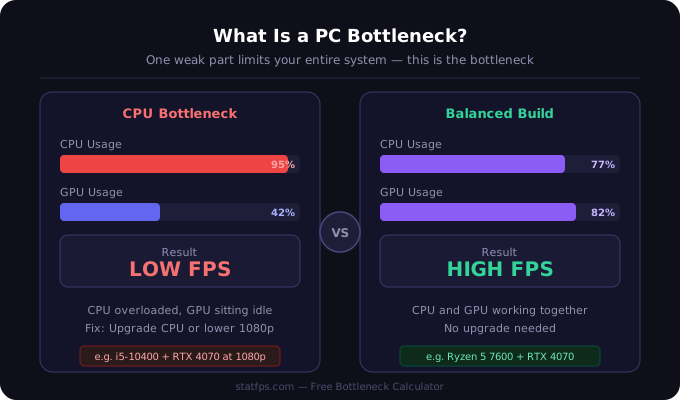
When one part of your PC is much weaker than the rest, it slows down the whole system. That weak part is called a bottleneck. Think of it like a four-lane road that suddenly narrows to one lane — it does not matter how wide the other lanes are, all traffic slows down at that one point.
This is exactly what happens inside your PC. A powerful GPU sitting idle because your CPU cannot feed it data fast enough. Or a fast processor waiting on a slow graphics card to finish rendering frames. Either way, you lose real performance — and most people never find out why.
3 Types of PC Bottlenecks That Actually Affect You
CPU Bottleneck Your processor cannot keep up with your GPU. It struggles to handle game logic, physics, and background tasks fast enough. You will see unstable frame rates and low FPS even when your GPU usage is sitting below 70%. This hits hardest at 1080p, where games lean heavily on the CPU.
GPU Bottleneck Your graphics card cannot render frames fast enough for your processor. FPS drops consistently in graphically demanding scenes. This becomes very obvious when you move from 1080p to 1440p or 4K — the GPU has to process far more pixels at those resolutions.
RAM Bottleneck Slow or insufficient memory chokes the data flow between CPU and GPU. Even a well-matched processor and graphics card will produce micro-stutters and poor frame timing if RAM speed is too low or XMP is not enabled in BIOS. 8GB RAM in 2025 causes real bottlenecks in modern titles like Cyberpunk 2077 and The Last of Us Part I.
Real Example: Same GPU, Very Different Results
An RTX 4070 paired with an i5-10400 at 1080p produces roughly a 30–35% CPU bottleneck. That same RTX 4070 with a Ryzen 5 7600 drops the bottleneck below 8% — which is balanced. The GPU did not change. Only the CPU changed. And the FPS difference is significant.
This is why guessing does not work. You need to check your actual combination before spending money.
How to Use This Bottleneck Calculator
Select your CPU, select your GPU, choose your resolution and primary use case, then click Analyze. Results appear in seconds — no account, no download, nothing to install.
The tool uses benchmark data from real component testing, not theoretical scores. It shows your bottleneck percentage, which part is limiting you, and what to actually do about it.
How to Read Your Bottleneck Results
| Bottleneck % | What It Means | Action |
| 0 – 10% | Balanced build | Nothing needed |
| 10 – 20% | Minor imbalance | Monitor it |
| 20 – 30% | Noticeable loss | Plan an upgrade |
| 30%+ | Serious mismatch | Upgrade soon |
One thing most tools do not tell you — a GPU bottleneck at 4K is normal and expected. A CPU bottleneck at 1080p is always a problem worth fixing.
How to Fix a Bottleneck Without Spending Money First
Before you upgrade anything, try these steps. Many users fix real performance problems at zero cost.
Enable XMP or EXPO in BIOS Most PCs ship with RAM running below its rated speed. Enabling XMP takes two minutes and often reduces micro-stuttering immediately. This is the most overlooked free fix for bottleneck symptoms.
Close Background Processes Before Gaming Browsers, Discord, update services, and overlays all consume CPU resources quietly. Closing them before gaming frees up meaningful headroom — especially for CPU-bottlenecked systems.
Update Your GPU and Chipset Drivers Outdated drivers reduce performance in ways that look like a hardware bottleneck but are actually a software fix. Both GPU drivers and motherboard chipset drivers matter here.
Check for Thermal Throttling When a CPU overheats, it slows itself down automatically to cool off. Clean dust from your cooler and check CPU temperatures using HWiNFO. A throttling processor looks identical to an underpowered one in performance data — and most people never check this.
If none of these fix the problem, the calculator will tell you exactly which component to upgrade — so you spend money on the right part instead of guessing.
Does a Bottleneck Damage Your PC?
No. A bottleneck does not physically harm any component. It means one part works harder than others. The only indirect concern is extra heat from an overworked CPU or GPU — manageable with basic cooling.
Run the check above. Takes under 60 seconds and tells you exactly where your system stands.
StatFPS Bottleneck Calculator uses real benchmark data to analyze your CPU and GPU balance — free, no signup needed.